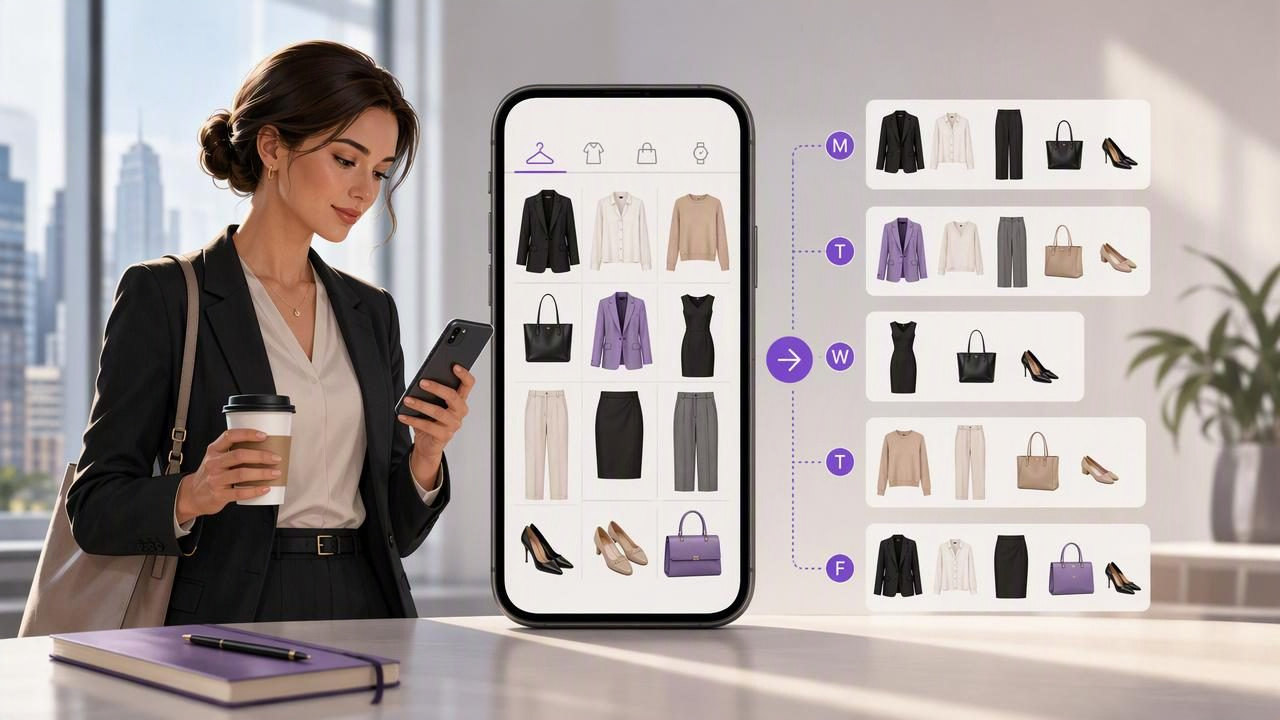
For busy professionals, deciding what to wear can become an unnecessary daily negotiation. You may have a full closet, a calendar packed with meetings, and only ten minutes between getting ready and leaving the house. The result is familiar: repeating the same safe outfit, overlooking useful pieces, or trying on several combinations when you should be answering emails, making breakfast, or getting out the door.
A digital closet app for busy professionals can turn that rushed process into a practical weekly system. Instead of relying on memory or digging through hangers each morning, you create a visual record of the clothing you own, organize it in a way that reflects your real schedule, and save outfit combinations before you need them.
This is not about creating a perfect wardrobe or following every trend. It is about making your existing wardrobe easier to use. With a little setup and a short weekly routine, you can reduce outfit decision fatigue while still dressing appropriately for the work and life events on your calendar.
Why Workwear Decisions Take More Time Than They Should
Work outfits have more variables than casual dressing. A professional may need to account for office dress expectations, video calls, client meetings, commuting weather, after-work plans, and laundry availability. Even a simple question such as “What should I wear tomorrow?” can require several small decisions.
The issue is often not a lack of clothing. It is a lack of visibility. When you cannot quickly see your blazers, trousers, knitwear, shoes, and accessories together, you are more likely to default to what is clean, convenient, and already familiar.
A digital wardrobe provides a visual reference point. By cataloging garments with photos and useful categories, you can identify options without pulling everything out of the closet. That makes fashion planning more realistic for people whose time and attention are already stretched.
What a Digital Closet Should Do for a Busy Professional
The most useful digital closet is not necessarily the one with the most categories. It is one that helps you answer practical questions quickly:
- What can I wear for tomorrow’s presentation?
- Which work outfits have I not worn recently?
- Do I have a polished option for a dinner after the office?
- Which shoes work with these trousers?
- What is already available while other items are in the laundry?
To support those decisions, focus on four essentials: clear clothing photos, simple categories, occasion labels, and saved outfit combinations. These elements make the app a working wardrobe tool rather than another unfinished organizational project.
1. Clear Clothing Photos
Use photos that make each item recognizable at a glance. Lay clothing flat against a plain surface, hang it against a neutral wall, or use existing product photos only when they accurately represent your item. You do not need studio-quality images. You need consistent, useful ones.
Photograph your most frequently worn clothing first: work trousers, shirts, blouses, blazers, dresses, knitwear, outerwear, everyday shoes, and bags. These pieces create the biggest immediate benefit because they are involved in your regular decisions.
2. Categories That Match Your Routine
Use categories you will actually search. “Tops,” “bottoms,” “layers,” “shoes,” and “accessories” are a good foundation. Then add filters that reflect your work life, such as:
- Office casual
- Client meeting
- Video call
- Business travel
- After-work event
- Cold commute
Do not create twenty highly specific labels at the start. A system that takes too long to maintain will not survive a busy month. Begin with a small set and adjust after you notice repeated needs.
3. Saved Looks for Repeatable Success
Saved outfits are where a digital wardrobe becomes especially valuable. A successful look does not need to be reinvented every time. Save combinations that have worked well for a presentation, a normal office day, a networking event, or a hybrid-work video call.
Think of saved looks as your personal outfit library. You can reuse them exactly, change one layer for the weather, or use them as a starting point when you want a slightly different version.
A 15-Minute Weekly Fashion Planning Routine
The best time to plan outfits is usually not on a rushed weekday morning. Set aside 15 minutes on Sunday evening, Monday morning, or whenever your work calendar becomes clear. The goal is not to schedule every item perfectly. The goal is to remove the hardest decisions before they become urgent.
- Review your calendar. Mark days with presentations, client meetings, office visits, travel, networking, or social plans.
- Check the forecast and commute. Consider temperature changes, rain, walking distance, and whether you need an extra layer.
- Choose anchor outfits. Start with your two most important work events. Select polished combinations that make you feel prepared.
- Add flexible outfits. Save two or three dependable options for standard workdays. These can be simple variations on a base formula.
- Identify a backup. Choose one outfit that works if laundry, weather, or a last-minute schedule change disrupts the plan.
- Prepare what you can. Hang key items together, check that shoes are ready, and make a note of anything that needs steaming or washing.
This routine prevents the common mistake of planning only the visible clothes. A good outfit also needs practical support: clean socks, suitable shoes, weather protection, and an appropriate bag.
Concrete Example: Planning a Five-Day Workweek
Consider Maya, a project manager with a hybrid schedule. Her week includes two office days, one client presentation, two home-working days, and a Thursday evening dinner. Instead of making five separate decisions each morning, she uses her digital closet to build a small plan from garments she already owns.
| Day | Schedule | Saved Outfit Combination | Practical Adjustment |
|---|---|---|---|
| Monday | Home office video calls | Fine-knit top, tailored dark trousers, simple earrings | Add a cardigan for a cool home workspace. |
| Tuesday | Office collaboration | White shirt, relaxed blazer, straight-leg trousers, loafers | Keep a lightweight umbrella in her work bag. |
| Wednesday | Client presentation | Structured blazer, neutral top, matching trousers, polished flats | Steam the blazer the night before. |
| Thursday | Office plus dinner | Midi dress, ankle boots, tailored coat | Bring a small evening bag to switch after work. |
| Friday | Home office and errands | Comfortable knit, dark jeans, clean sneakers | Use the relaxed day to wash key work pieces. |
Maya is not buying a new wardrobe or limiting herself to a strict capsule. She is using visual planning to make her existing clothes easier to coordinate. Her Wednesday presentation outfit is selected early, so she can confirm that every piece is clean and ready. Her Thursday outfit works for two settings, reducing the need for a full change of clothes.
How to Build More Outfit Combinations Without Buying More
One of the benefits of a smart closet organizer is seeing repeated patterns in your wardrobe. You may discover that one pair of trousers works with four tops, or that a blazer you reserve for formal meetings also improves simple knitwear and jeans.
Try creating outfit formulas rather than searching for completely new looks every week. A formula gives you structure while leaving room for variation.
- Meeting formula: tailored trousers + refined top + structured layer + polished shoes
- Office casual formula: dark denim or relaxed trousers + knitwear or shirt + loafers or clean sneakers
- Video-call formula: solid-color top + simple jewelry + comfortable bottoms outside the camera frame
- Day-to-evening formula: work dress or trousers + adaptable shoes + one accessory change
Save two or three versions of each formula in your digital wardrobe. When your schedule changes, you can choose an appropriate template rather than starting from scratch.
Use AI Outfit Visualization Carefully
An AI outfit generator can be useful when you want to visualize clothing combinations from your own wardrobe before getting dressed. For example, if you are unsure whether a camel coat, navy trousers, and white trainers create the right balance for a casual office day, an AI-generated visual can help you compare the overall styling direction.
Virtual try-on is best treated as a style visualization tool, not a guarantee of exact real-world results. Photos, lighting, garment drape, body position, and image quality can affect what you see. It cannot reliably confirm precise fit, sizing, fabric weight, comfort, transparency, stretch, or how a garment will move during a commute.
Use the visualization to narrow choices, then rely on your own experience with the clothes for final decisions. If an outfit involves an unfamiliar shoe, a new tailoring adjustment, or a long event, test it in real life before an important day.
Common Mistakes That Make Digital Wardrobes Less Useful
- Cataloging everything before using anything: Start with your workwear essentials. Add occasional pieces later.
- Creating vague saved looks: Include shoes, outerwear, and accessories when they matter to the final outfit.
- Ignoring laundry status: A great outfit is not helpful if its key shirt is unavailable on the day you need it.
- Planning too rigidly: Leave room for weather changes, energy levels, and unexpected meetings.
- Saving only special-event outfits: Your ordinary weekday combinations will deliver the most time savings.
Make Your Wardrobe Work on Your Schedule
A digital closet app for busy professionals is most effective when it supports your real life: recurring meetings, changing weather, limited mornings, and a wardrobe that already contains more possibilities than you can easily remember. Build a simple visual inventory, save reliable combinations, and reserve a few minutes each week for planning.
The purpose is not to make every day a fashion project. It is to make getting dressed calmer, faster, and more intentional. For people who want to explore a digital wardrobe approach to organizing garments and saving looks, Outfit Maker’s guide to building a digital closet offers a helpful starting point.
