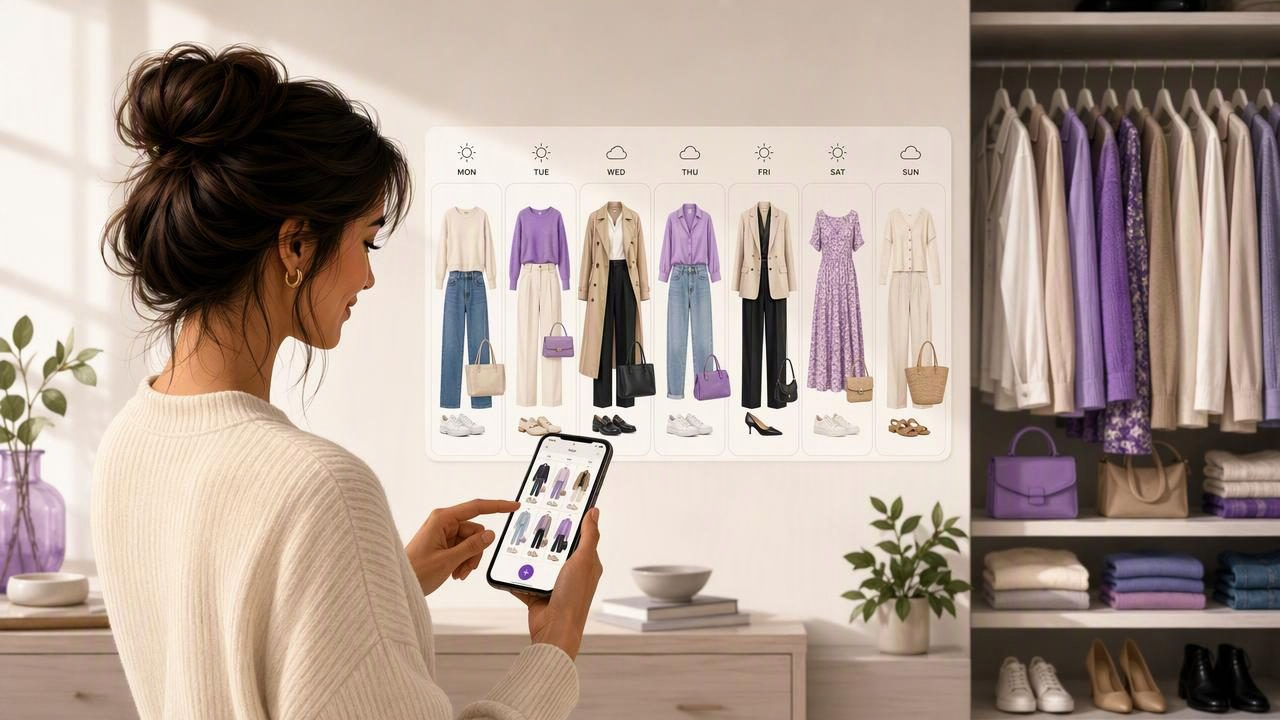
Finding the best personal styling app to plan a week of outfits is less about chasing endless new looks and more about making the clothes you already own easier to use. A thoughtful weekly outfit plan can reduce rushed mornings, prevent forgotten wardrobe items, and help you dress appropriately for work, social plans, weather changes, and personal style preferences.
The right app should support real-life fashion planning. That means helping you build outfits from your own garments, see possible combinations, keep a record of looks you like, and adjust plans when your week changes. It should not promise that a digital image can perfectly predict fit, sizing, comfort, or how a fabric will behave throughout the day.
This guide explains the features that matter most, how to compare personal styling apps, and how to use a digital wardrobe to create a practical seven-day outfit plan.
What Makes a Personal Styling App Useful for Weekly Planning?
A personal styling app can mean many things: a closet catalog, a wardrobe planner, an AI outfit generator, or a virtual try-on tool. For weekly planning, the most useful option combines several of these functions in a way that fits your routine.
Instead of giving you random trend-based suggestions, a helpful app should work from the clothing you actually have. This keeps outfit ideas realistic and makes it easier to repeat favorite combinations in new ways.
Core features to prioritize
- Digital wardrobe organization: Add photos of clothing, shoes, outerwear, and accessories so your closet is visible in one place.
- Outfit combination planning: Build complete looks from individual garments rather than relying on vague style inspiration.
- Calendar-friendly planning: Assign looks to workdays, events, travel days, or casual plans.
- Virtual try-on visualization: Use photos to explore how an outfit combination may look before changing clothes.
- Saved outfits: Keep successful looks available for future weeks, especially reliable work or event outfits.
- Sharing options: Send a few outfit choices to a friend when you want a second opinion.
The best feature set depends on your needs. Someone with a small capsule wardrobe may value outfit repetition and calendar planning, while someone with a large closet may first need a better smart closet organizer to make every item visible.
Why Plan a Full Week of Outfits?
Weekly fashion planning creates a useful middle ground between choosing an outfit every morning and planning every look months ahead. You can account for your schedule while remaining flexible enough to respond to weather, laundry, energy levels, or an unexpected invitation.
A seven-day plan also reveals wardrobe patterns. You may notice that you wear the same black trousers three times because they work with everything, while several tops remain unworn because they do not pair easily with your current shoes or layers. That insight can improve future shopping decisions without assuming you need to buy more clothes.
| Weekly planning challenge | How a styling app can help |
|---|---|
| Busy weekday mornings | Prepare complete outfits before the week begins. |
| Forgotten garments | View your wardrobe digitally and rediscover pieces. |
| Dress-code uncertainty | Save polished, casual, and event-ready outfit formulas. |
| Overpacking for short trips | See which garments can create several planned looks. |
| Indecision between two looks | Compare outfit combinations or share them for feedback. |
How to Choose the Best Personal Styling App for Your Routine
Before downloading any wardrobe planning tool, consider how you make decisions now. If your biggest challenge is remembering what you own, cataloging matters most. If you have plenty of clothes but struggle to combine them, outfit-building and visualization tools may be more valuable.
1. Look for planning based on your own closet
General style inspiration can be enjoyable, but it often features clothing you do not own. A digital wardrobe is more practical because it starts with your actual items. Uploading a cream cardigan, navy trousers, white sneakers, and a patterned scarf gives you a realistic set of pieces to arrange.
This approach also helps you see gaps with more clarity. For example, if five tops work with only one pair of office-appropriate pants, that is a specific wardrobe observation. It is more useful than broadly deciding that you need a “new work wardrobe.”
2. Choose clear outfit visualization tools
Virtual try-on and AI outfit generator tools can make planning faster by showing a visual representation of an outfit from photos. This is particularly helpful when deciding whether colors, layers, or proportions feel balanced together.
However, use visualizations as a styling aid, not a guarantee. An AI-generated preview may help you compare a denim jacket with a blazer, but it cannot confirm exact fit, garment length, fabric drape, transparency, stretch, warmth, or comfort. Try on important outfits in person before a major event or a long day away from home.
3. Make sure saving looks is simple
Weekly planning only saves time if you can easily return to outfits that worked. Look for a system that lets you save complete combinations and label them in a way that makes sense to you, such as “client meeting,” “rainy commute,” “Saturday brunch,” or “easy travel day.”
Over time, saved looks become a personal style library. Instead of rebuilding an outfit from scratch, you can adapt a reliable formula by swapping one item, such as trading loafers for boots when the forecast changes.
4. Avoid apps that make unrealistic promises
No app can fully replace your own judgment. A useful styling tool should support your decisions, not pressure you into constant purchases or imply that every suggested outfit will work perfectly. Your body, workplace, climate, laundry schedule, and comfort preferences remain essential parts of the planning process.
A Concrete Example: Planning Seven Days From a Small Closet
Imagine you have the following pieces available for one week:
- Two pairs of trousers: black straight-leg and beige wide-leg
- One dark-wash pair of jeans
- Three tops: white shirt, striped knit, and burgundy blouse
- Two layers: navy blazer and olive cardigan
- Two shoes: white sneakers and black ankle boots
- One weather-ready coat and a small crossbody bag
Rather than choosing seven unrelated outfits, build around repeatable combinations. Repeating trousers, shoes, or layers is normal and often makes a wardrobe more functional.
- Monday: Black trousers, white shirt, navy blazer, ankle boots for a polished start to the week.
- Tuesday: Beige trousers, striped knit, sneakers for a comfortable but put-together office day.
- Wednesday: Dark jeans, burgundy blouse, ankle boots for a casual meeting or evening plan.
- Thursday: Black trousers, striped knit, olive cardigan, sneakers for an easy repeatable formula.
- Friday: Beige trousers, white shirt, cardigan, ankle boots for a relaxed professional look.
- Saturday: Dark jeans, striped knit, sneakers for errands or casual plans.
- Sunday: Dark jeans, burgundy blouse, blazer, ankle boots for lunch or a social event.
A digital wardrobe lets you map these combinations before the week begins. You can then keep one backup option ready: perhaps black trousers, the burgundy blouse, and the blazer. That backup is useful if an item needs washing, the weather changes, or your planned outfit no longer feels right.
Practical rule: Plan for your real week, not an idealized one. Include comfort, commuting, laundry, temperature, and the possibility that one day may require a quick outfit change.
A Simple Weekly Outfit Planning Process
Set aside 20 to 30 minutes once a week, ideally after checking your calendar and local forecast. You do not need to catalog every garment immediately. Start with the pieces you wear most often, then expand your digital closet gradually.
- Review your schedule. Identify workdays, formal occasions, workouts, social plans, and travel time.
- Check weather conditions. Note temperature swings, rain, wind, and indoor versus outdoor activities.
- Choose anchor pieces. Begin with two or three bottoms, shoes, or layers you know you will wear.
- Create complete looks. Add tops, outerwear, and accessories so each plan is usable, not just partially formed.
- Save alternatives. Prepare one or two backup outfits for weather or mood changes.
- Review after wearing. Keep the looks you felt good in and adjust or remove combinations that did not suit your day.
Common Mistakes When Using a Styling App
- Planning too rigidly: A weekly plan should guide you, not create pressure to wear an outfit that no longer works.
- Ignoring practical details: Consider walking distance, office temperature, laundry, and footwear comfort.
- Cataloging without using the catalog: Start making outfit combinations as you add items, rather than treating your closet as a photo archive.
- Assuming virtual try-on confirms fit: Use it to visualize style combinations, then verify fit and comfort yourself.
- Creating too many options: Three strong looks for a type of occasion are often more useful than 30 unfinished ideas.
Build a Weekly System You Will Actually Use
The best personal styling app to plan a week of outfits is ultimately the one that helps you make faster, more confident decisions using your own clothes. Focus on tools that organize your wardrobe, help you create outfit combinations, allow you to save reliable looks, and provide visual support without overstating what technology can predict.
For a practical starting point, explore Outfit Maker’s guide to building a digital closet and begin by adding the garments you wear most often. Once those essentials are visible, planning a flexible week of outfits becomes much easier.
